
Appearance
Security Center
Security Center brings the dependency alerts from your connected repositories into one place. GitHub Dependabot detects the vulnerable dependency on the repository's default branch. EasyMerge helps you prioritise the alert, follow its fix pull request and record how your team plans to handle it.
Security Center is available on every plan.
What it does not do
Security Center does not scan dependencies itself, run CI, change an alert on GitHub or merge a security update.
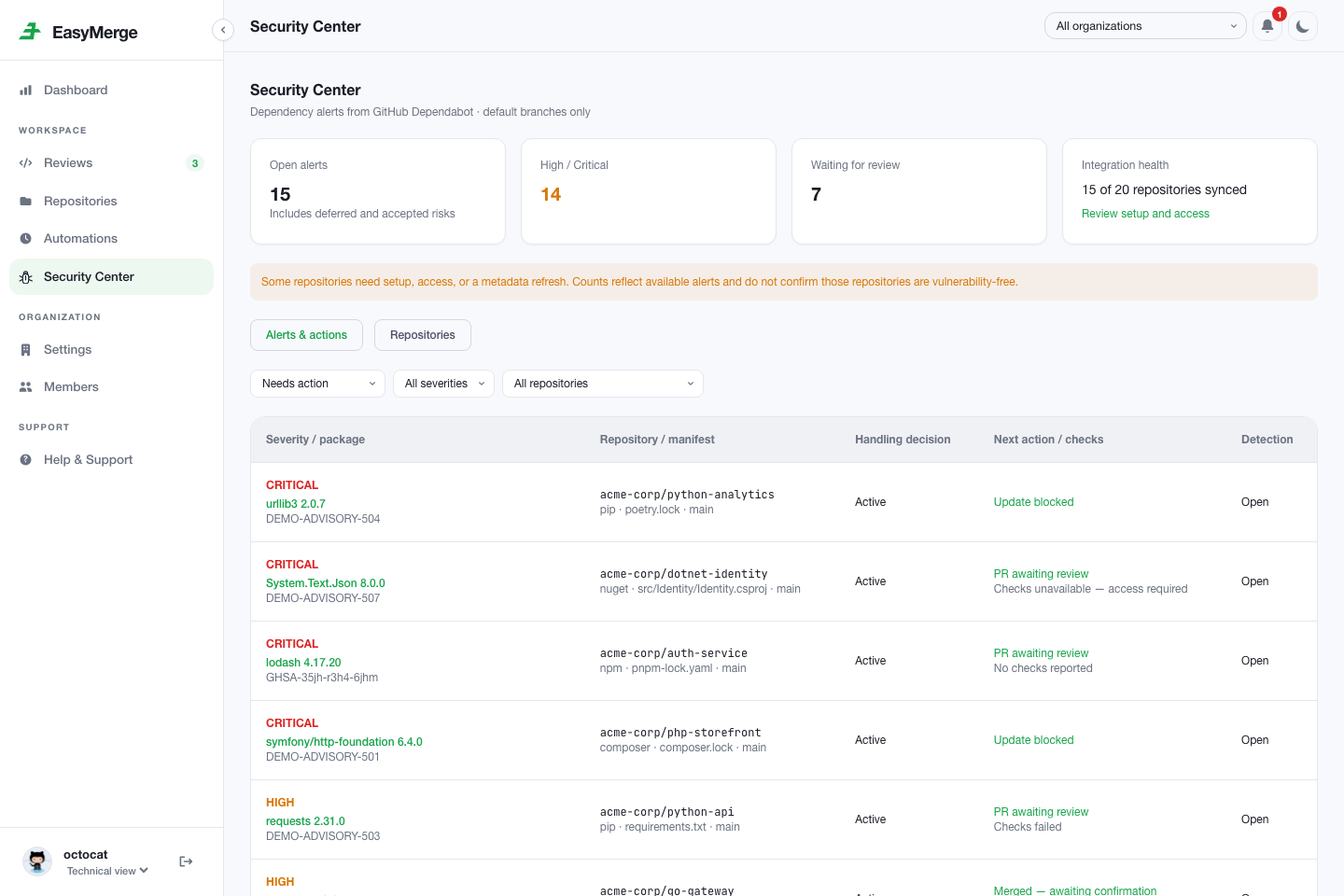
Counts need context
An access, setup, coverage or sync warning means EasyMerge has incomplete data. A zero count does not confirm that the affected repository is vulnerability-free.
Set up GitHub
Three separate permissions need to be in place. A repository with missing setup or access is shown as Setup required, Access required or Status unavailable. EasyMerge does not present missing data as a clean repository.
1. Approve the GitHub App permissions
An installation owner must approve EasyMerge's dependency-security permissions. Follow Configure on GitHub from the banner in EasyMerge, or open GitHub → Settings → Applications → Installed GitHub Apps → EasyMerge → Configure.
EasyMerge requests read access for this feature:
| Permission | Why EasyMerge needs it |
|---|---|
| Dependabot alerts | Import the repository's alerts |
| Checks | Show check runs for a security update pull request |
| Commit statuses | Show statuses reported by repository tooling |
| Administration | Check whether Dependabot alerts and security updates are enabled |
| Contents, pull requests and metadata | Read configuration and show pull request details |
Read-only access
Administration is read-only. EasyMerge cannot enable a GitHub security feature, change repository settings or dismiss an alert for you.
Waiting for approval
If an existing installation is waiting for approval, pull request reviews continue as normal. Security Center cannot sync that installation until its owner accepts the new permissions.
2. Enable Dependabot for the repository
On GitHub, open the repository → Settings → Security and quality → Advanced Security, then enable:
- Dependency graph, so GitHub can identify dependencies from supported manifests and lockfiles.
- Dependabot alerts, so GitHub reports vulnerable dependencies.
- Dependabot security updates, if you want GitHub to open pull requests for available fixes.
Security updates are optional for viewing alerts. Without them, an alert may have no fix pull request. You do not need to install a separate Dependabot App. See GitHub's guides to Dependabot alerts and security updates.
3. Check your repository access
You need write, maintain or admin access on GitHub to see alert details, sync metadata and set a handling decision in EasyMerge. With read or triage access, you can see that the repository needs access but not its alerts or counts.
Your EasyMerge organization role does not replace repository access granted on GitHub.
Read the overview
The cards at the top cover every repository you can access, not only the current page or filter:
| Card | What it counts |
|---|---|
| Open alerts | All alerts still open on GitHub, including deferred and accepted risks |
| High / Critical | Open alerts with either severity |
| Waiting for review | Alerts with an open fix pull request awaiting review |
| Integration health | Repositories whose latest Dependabot metadata is available |
Use Alerts & actions to filter by next action, severity or repository, then select anywhere on a row to open that alert. One advisory may appear more than once when it affects several repositories or manifests.
Use Repositories to check Dependabot setup, your access, package-manager coverage, security updates and the last successful sync. Synced with coverage gaps means GitHub does not cover every detected manifest. It is not confirmation that the repository has no vulnerable dependencies.
Sync metadata refreshes the data available from GitHub. It does not ask GitHub to scan the repository, enable Dependabot, run tests or create a pull request. It is unavailable while the repository's EasyMerge installation is suspended (Sync is paused while this installation is suspended.); the last synced data stays visible.
Configure on GitHub opens the repository's security settings on GitHub. It is shown only to GitHub repository admins, since GitHub does not open those settings for anyone else; other members see Admins configure on GitHub instead.
Work through an alert
Open an alert to see:
- the affected package, the advisory title, the Dependabot alert number and when it was first detected;
- the repository and default branch, and the manifest, ecosystem and dependency relationship;
- under Fix, the affected version range and the patched version, when GitHub reports one;
- any related security update pull request, with its checks (select the checks line to expand the list);
- at the bottom, the last successful metadata sync and any tracking issue on GitHub.
Use Open Dependabot alert to go to the alert on GitHub, or Project Status to see the repository's other evidence.
Review and merge fixes on GitHub. EasyMerge does not run the checks or merge the pull request. If a commit reports more than 1,000 check runs or more than 1,000 commit statuses, EasyMerge shows Checks unavailable instead of a partial list.
After a merge
A merged pull request is shown as awaiting confirmation until Dependabot reports the alert as fixed.
Handling decisions
Under Handling in EasyMerge, choose one decision to organise the alert, then select Save:
| Decision | Use it when |
|---|---|
| Active | The alert still needs action |
| Defer | You plan to return to it later |
| Accept risk | Your team has chosen to leave the risk in place |
Organising only
Changing this decision does not dismiss the GitHub alert or mark the vulnerability as fixed. Deferred and accepted risks remain in the Open alerts total.
Change the decision back to Active whenever it needs attention again.
Get notified about new high and critical alerts
When Dependabot reports a new High or Critical alert, EasyMerge sends an in-app notification, such as Critical alert: lodash in acme/web, to everyone who can see that repository's alerts. Selecting the notification opens the alert.
The setting is on by default. To turn it off, open the notifications menu and switch off Notify me about new high/critical alerts. It applies to every repository where you can see Dependabot alerts.
Security and automation notifications appear only while your organization's plan, and the GitHub App permissions it has accepted, allow them.